IconRadioGroup

Adds an icon-based radio group panel in the Makeswift builder to visually select a string value from a set of icon options.
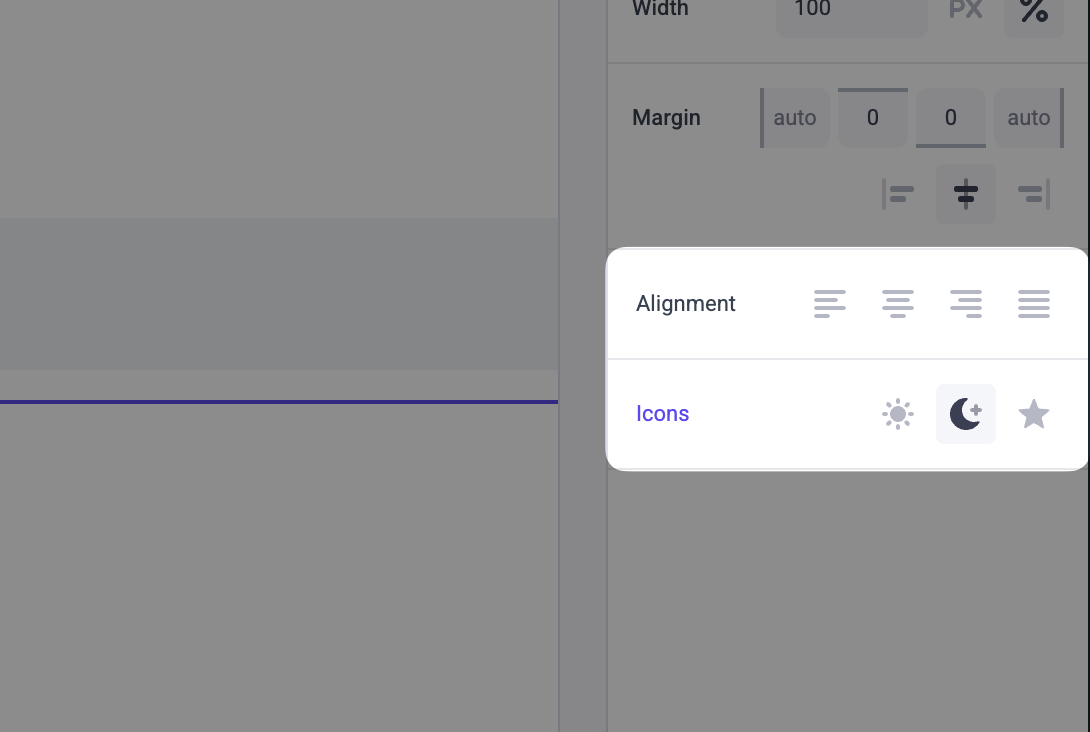
An IconRadioGroup panel showing Alignment and Icons options

Params

label
string

Text for the panel label in the Makeswift builder.

options
IconRadioGroupOption<T>[]Required

A non-empty array of options displayed as selectable icons in the panel.

1type IconRadioGroupOption<T extends string> = {
2 value: T;
3 label: string;
4 icon: IconRadioGroupIcon;
5};

The label is shown as a tooltip in the builder. The icon determines which icon is rendered for the option — use a kebab-case string (e.g. 'align-left') or the IconRadioGroup.Icon accessor (e.g. IconRadioGroup.Icon.AlignLeft).

defaultValue
T

The value passed to your component when nothing is set in the Makeswift builder.

Prop type

The IconRadioGroup control passes the generic type T from the selected option to your component. If you don’t set a defaultValue and no value is set in the builder, your component receives undefined.

Example

The following example adds an IconRadioGroup control to the alignment prop of a TextBlock component using bare kebab-case strings.

1import { IconRadioGroup } from "@makeswift/runtime/controls";
2
3import { runtime } from "../../../../../makeswift/runtime";
4
5import { TextBlock } from "./TextBlock";
6
7runtime.registerComponent(TextBlock, {
8 type: "text-block",
9 label: "Text Block",
10 props: {
11 alignment: IconRadioGroup({
12 label: "Alignment",
13 options: [
14 { value: "left", label: "Left", icon: "text-align-left" },
15 { value: "center", label: "Center", icon: "text-align-center" },
16 { value: "right", label: "Right", icon: "text-align-right" },
17 { value: "justify", label: "Justify", icon: "text-align-justify" },
18 ],
19 defaultValue: "left",
20 }),
21 },
22});

Icons

Access icons via IconRadioGroup.Icon or pass a bare kebab-case string. The following icons are available:

PreviewValue
activity
align-center
align-left
align-right
arrow-center
arrow-down-up
arrow-inside
arrow-outside
arrow-right
arrows-up-down
aspect-standard
aspect-wide
audio
billing
blank-page
border-dashed
border-dotted
border-solid
button-pill
button-rounded
button-square
chat
chat-ai
checkbox
checkmark
clock
code
cog
connection
corners
countdown-solid
cube
database
deny
desktop
document
download
drop
dropdown
duplicate
ellipsis
email
eye
file
file-upload
folder
folder-arrow
folder-upload
gallery
globe
globe-ai
gradient-linear
gradient-radial
graph
grid-circles
height-auto
height-match
help
help-circle
hidden
image
info
italic
key
keyboard
link
logo-angellist
logo-apple
logo-bigcommerce
logo-bynder
logo-codepen
logo-codesandbox
logo-discord
logo-dribbble
logo-facebook
logo-github
logo-google
logo-instagram
logo-linkedin
logo-mastodon
logo-medium
logo-messenger
logo-nextjs
logo-nextjs-outline
logo-notion
logo-pinterest
logo-reddit
logo-slack
logo-snapchat
logo-soundcloud
logo-spotify
logo-telegram
logo-tiktok
logo-twitch
logo-vimeo
logo-whatsapp
logo-x
logo-yelp
logo-youtube
logout
minus
mobile
moon
multi-select
number
offline
pencil
percent
phone
plus
popout
publish
px
radio-button
redirect
redo
rename
repeat-x
repeat-xy
repeat-y
reset
retry
rss
search
settings
shadow-inner
shadow-outer
share
sidebar-closed
sidebar-open
sides
sparkles
star
star-circle
strikethrough
subscript
sun
superscript
swap
tablet
template
test-tube
text
text-ai
text-align-center
text-align-justify
text-align-left
text-align-right
text-input
times
trash
underline
undo
upload
uppercase
user
users
vertical-align-end
vertical-align-middle
vertical-align-space-between
vertical-align-start
video
warning

.makeswift.ts is a naming convention for organizing Makeswift registration code. Learn more.