
Navigation Sidebar updates
The Navigation Sidebar has been reorganized around a split pane that shows your pages and the Elements Panel at the same time, and you can now sort elements directly in the Elements Panel.
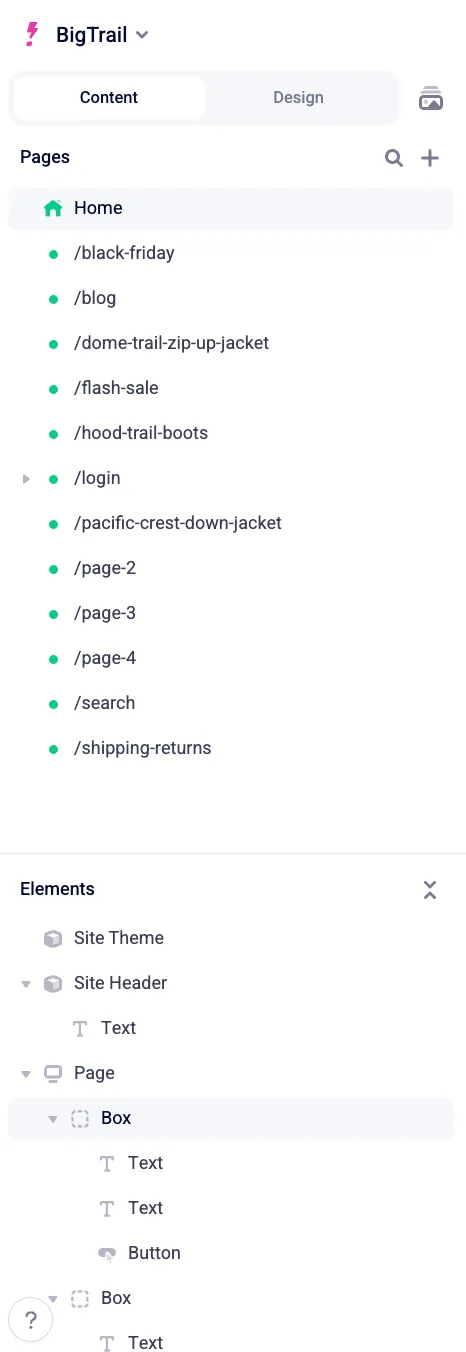
- Split pane for pages and elements — pages and the Elements Panel share the sidebar, so you can move between pages and inspect the structure of the current page without switching panels.
- Settings in the site switcher — workspace and site settings have moved into the site switcher menu at the top of the sidebar.
- Files manager button — files open from the button beside the Content and Design tabs.
- Updated Help button — the ? button in the bottom left now opens Contact support, View docs, Shortcuts, and the updated Diagnostics dialog for gathering diagnostic information.
- Sort elements in the Elements Panel — drag an element in the Elements Panel to reorder it within its parent, without dragging it on the Canvas.
For details, see The basics.