
Sandbox and Production Storefronts
Run a sandbox and a production BigCommerce Catalyst storefront, each in its own store, and manage both as separate sites in a single Makeswift workspace.
This guide walks through connecting two BigCommerce Catalyst storefronts — one in a sandbox store and one in a production store — to one Makeswift workspace. When you’re done, each storefront is editable in the Visual Builder as its own Makeswift site, and you switch between them from the same workspace.
How workspaces, sites, and storefronts relate
Three ideas make the rest of the setup click:
- A Makeswift workspace is a container for your team and billing. It can hold many sites.
- A Makeswift site is one editable storefront. Each site has its own Site API key (
MAKESWIFT_SITE_API_KEY). - A Catalyst storefront connects to exactly one Makeswift site — the one whose Site API key it carries.
So “two storefronts in one workspace” is really: one workspace → two sites → two Site API keys → two storefronts.
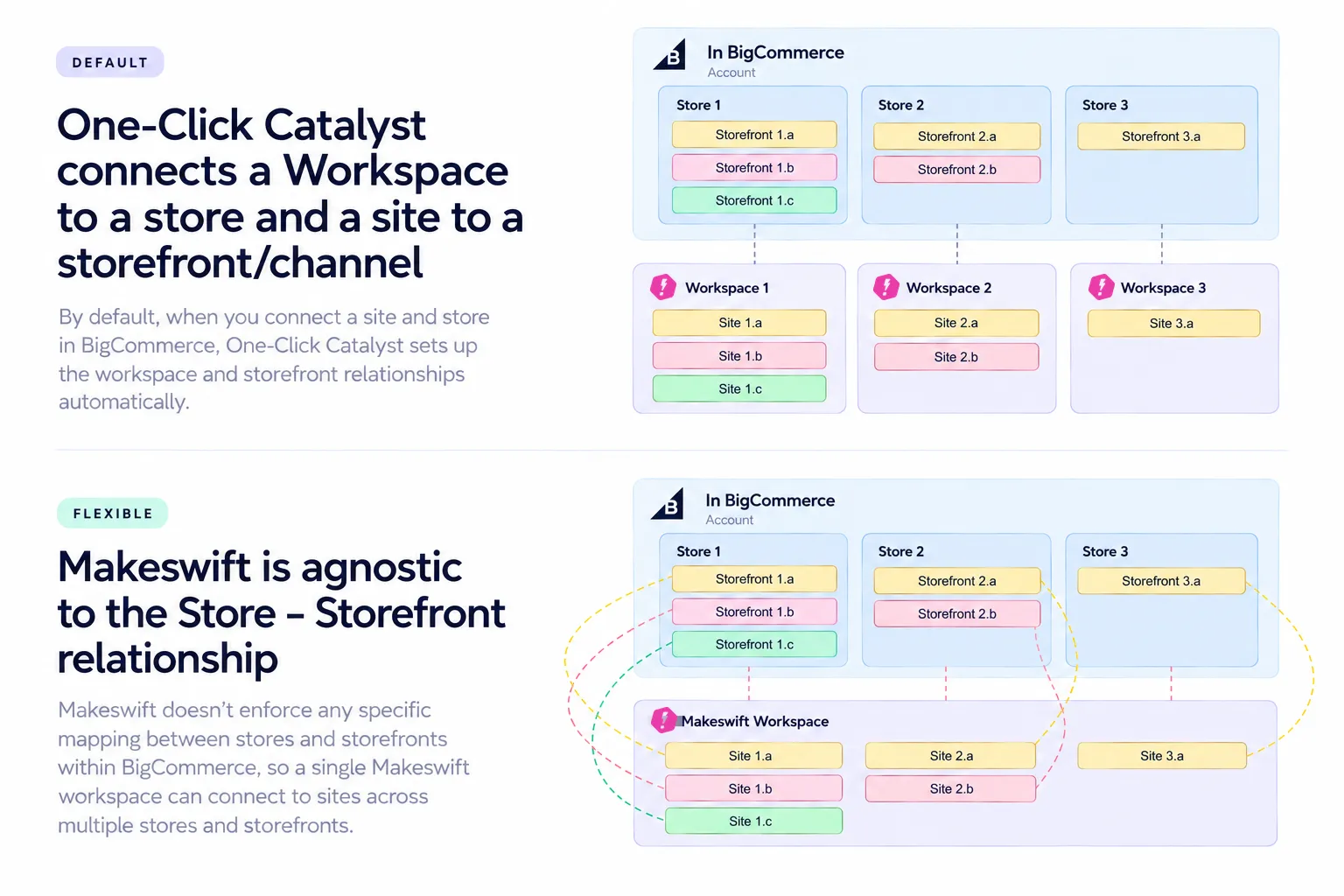
The most common mistake is using the same MAKESWIFT_SITE_API_KEY for both storefronts. If you do, both storefronts point at the same site and share the same visual content, which defeats the purpose. Each storefront needs its own site’s key.
Prerequisites
- Two BigCommerce stores (one sandbox and one production). You create a Catalyst channel in each one in the first step.
- One Makeswift workspace that the sites are provisioned into.
- Node.js 24 installed locally (current Catalyst requires it).
- A hosting provider for each storefront. Catalyst targets Vercel, but any Node host that runs Next.js works.
Set up the storefronts
Create a Catalyst channel and Makeswift site for each store
Use One-Click Catalyst (OCC) to spin up each storefront. OCC creates the Catalyst storefront channel in your BigCommerce store, deploys a hosted preview, and provisions a corresponding site in your Makeswift workspace. The channel must exist before the Makeswift site is created, and OCC handles that ordering for you.
- In your sandbox store, run One-Click Catalyst. This creates the sandbox channel and Site A in your Makeswift workspace. Open Site A’s Site Settings → API key and copy the key. This is
MAKESWIFT_SITE_API_KEYfor storefront A. - In your production store, run One-Click Catalyst again. This creates the production channel and Site B in the same workspace. Copy Site B’s Site API key. This is a different value.
You now have two channels and two keys, one per site, all tied to one workspace. Each key connects one storefront to one site, so keep track of which is which.
Scaffold each Catalyst storefront
Once you’re ready to work in code, connect a local codebase to each channel. Each BigCommerce store and channel gives you its own create-catalyst command. In the BigCommerce control panel, go to Channel → Storefronts → Catalyst → set up locally. The command looks like this, with values that differ per store:
Run it twice — once per store — into two separate project folders:
The only Makeswift-specific difference between the two projects is the MAKESWIFT_SITE_API_KEY: sandbox uses Site A’s key and production uses Site B’s key. The store hash, channel ID, and storefront token differ because they come from different stores.
The command writes your values into .env.local at the project root. This file is already gitignored, so your tokens aren’t committed.
Run each storefront locally (optional)
From each project’s root:
Catalyst reads .env.local from the project root and starts on port 3000 by default. Set PORT to change it.
Confirm the Makeswift connection is healthy by loading http://localhost:3000/api/makeswift/manifest?secret=<MAKESWIFT_SITE_API_KEY> in your browser. It should return a 200 response.
To edit a local storefront in the Visual Builder, set that site’s host URL (see the last step) to your local URL, for example http://localhost:3000.
Deploy each storefront
Deploy each project to your hosting provider by following the standard Catalyst deployment docs for your host. Two things matter for Makeswift:
- Set the environment variables in the host’s project settings. Use the same keys from each project’s
.env.local, including that store’sMAKESWIFT_SITE_API_KEY. Environment variables aren’t in git, so the host needs them explicitly. - Make the deployment publicly reachable. If your host puts an authentication or password wall in front of the deployment, Makeswift can’t load it. See Troubleshooting.
You end up with two deployed URLs, one per storefront.
Point each Makeswift site at its storefront
For each site, go to Site Settings → Host in Makeswift and set the host URL to that storefront’s URL:
The site and the storefront must share the same Site API key. Site A (key A) must point at the storefront whose MAKESWIFT_SITE_API_KEY is key A. Cross-wiring them is the most common reason the builder won’t connect.
Open either site in Makeswift and you’re editing that store’s storefront, both from one workspace.
Troubleshooting
Builder won't connect, can't select elements, or manifest returns 401 (Unauthorized)
The site’s Site API key doesn’t match the storefront’s MAKESWIFT_SITE_API_KEY. The host URL is pointing at a storefront configured for a different site.
Make the keys match — either update the storefront’s environment variable or point the site at the correct storefront — then redeploy or restart. Any follow-on CORS errors are a symptom of the 401: a rejected response carries no CORS headers.
Builder shows a login wall instead of your storefront
Your host’s deployment protection (for example, Vercel Authentication or password protection) is blocking Makeswift.
Open the deployed URL in a private browser window. If you see a host login screen, disable protection for that URL or configure a protection bypass so Makeswift can reach it.
Deploy build fails with 'Cannot convert argument to a ByteString … value of 8226'
A storefront token environment variable contains a • (bullet) character. You copied it from a masked field (dots or asterisks) and grabbed the bullets instead of the real value.
Re-enter the token from a clean, unmasked source.
Build fails with 'Missing store hash' or a similar missing value
An environment variable the build needs isn’t present in the host environment.
Confirm every key from .env.local is set in the host’s project settings.
Local dev throws 'URLPattern is not a constructor' (HTTP 500)
You’re on an older version of Node. Current Catalyst needs Node.js 24 to run and build.
Summary
One workspace, two sites, two Site API keys. Give each Catalyst storefront its own site’s MAKESWIFT_SITE_API_KEY, deploy it somewhere Makeswift can reach, and set that site’s host URL to that storefront. Keep the key ↔ site ↔ storefront triple aligned and everything connects.
Related
- Environments — the recommended development and production site setup for any Makeswift project.
- Builder messages — what the Visual Builder’s connection messages mean.